VINAIspectro Manual
A bit-transparent M/S spectrum analyzer with two views: a 31-band LED rack and a high-resolution FFT that draws MID and SIDE as separate traces, with a press-and-hold cursor that reads frequency, musical note and level. A TILT knob slopes both views together, from flat to 6 dB/oct. Zero latency, zero footprint. v1.0.0 · VST3 · AU.
01Overview
VINAIspectro is an analysis tool, not a processor. It taps the signal and renders the spectrum in one of two personalities: RACK, a classic 31-band third-octave LED ladder that reads like hardware, and FFT, a high-resolution curve analyzer that splits the stereo image into its true components and draws MID and SIDE as separate simultaneous traces. What sits in the centre of your mix is the lava line; what lives in the width is the blue one.
The audio leaves exactly as it arrived: bit-transparent, sample-accurate, zero added latency. Park it anywhere in the chain, leave it on the master through bounce, A/B with it inserted: the sound never changes, only your view of it does. Hold the mouse on any peak in the FFT view and the cursor tells you the exact frequency, the musical note with its cents offset, and the level under the pointer.
02The interface
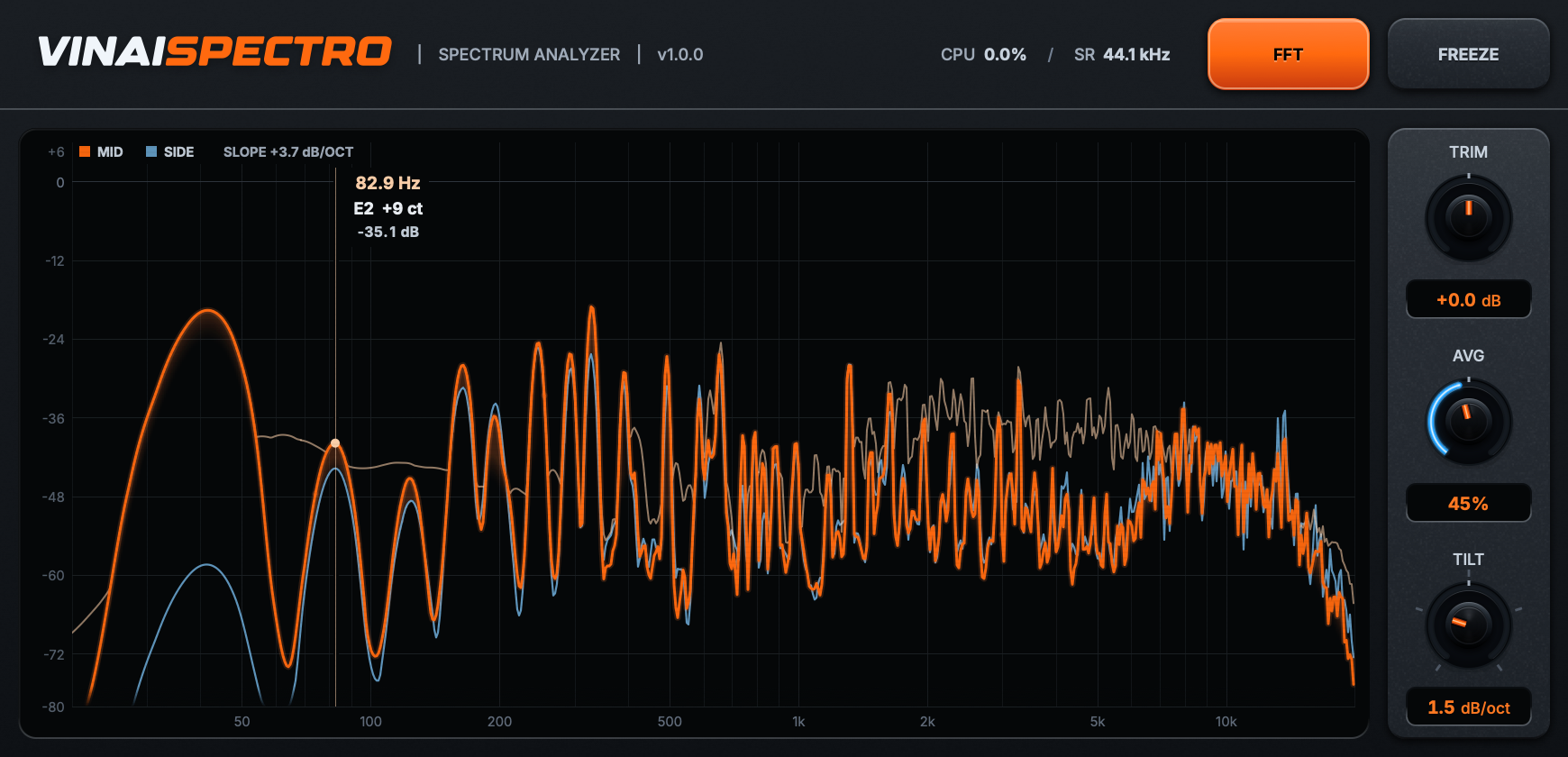
- Analyzer display (center): the RACK ladder or the FFT curves, with the same +6 to −80 dB rail in both views and a log frequency axis from 20 Hz to 20 kHz.
- MODE card (top row): flips between RACK and FFT. The choice is a plugin parameter, so it recalls with the session and can be automated.
- FREEZE: holds the current frame on screen so you can study a captured moment.
- Control strip (TRIM · AVG · TILT): display offset, analyzer release and display slope.
- OVER tag: wakes the instant the analyzed signal crosses full scale. It keys on the true level, before any display tilt.
03The two views
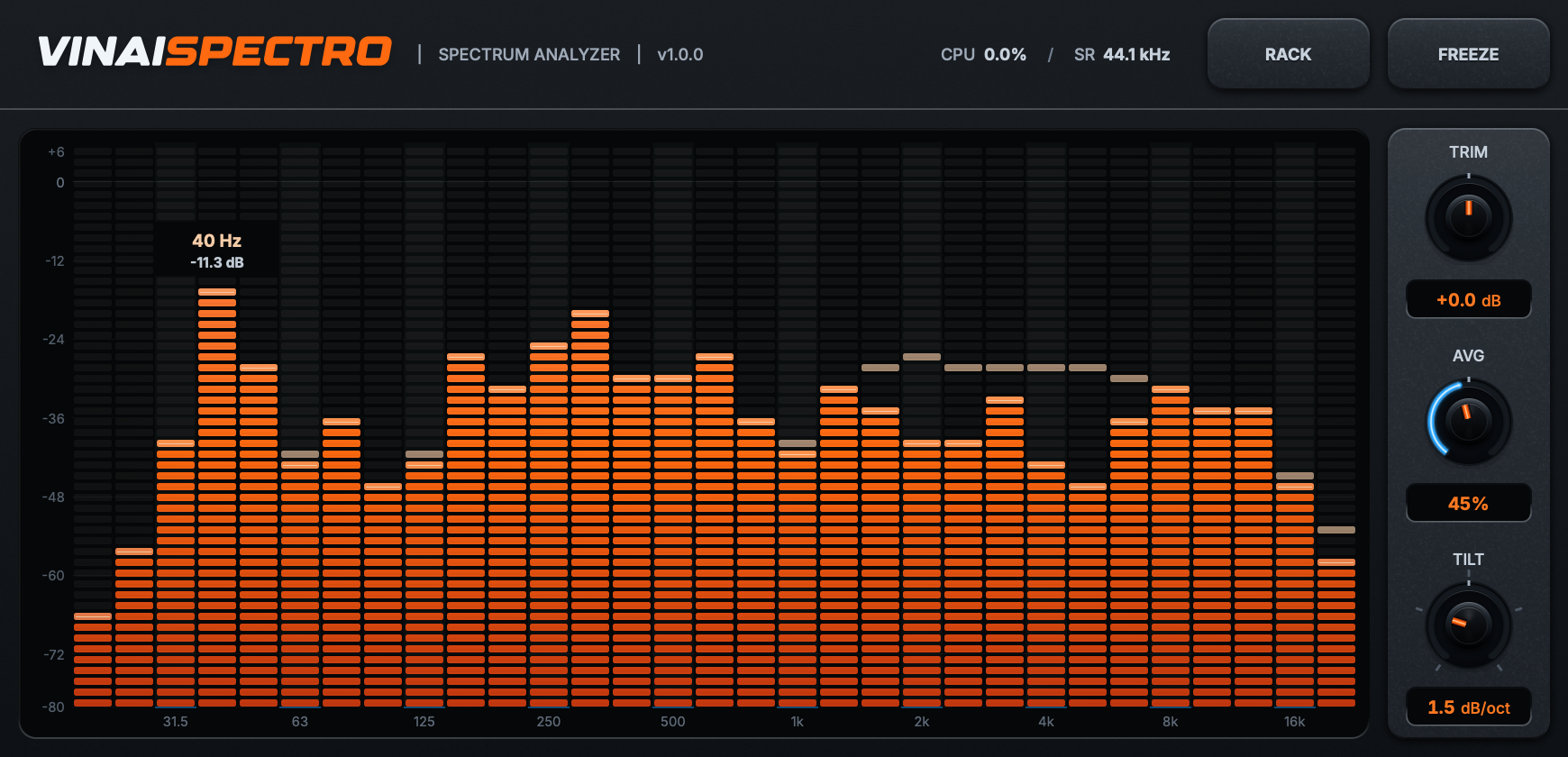
- RACK: 31 ISO third-octave bands from 20 Hz to 20 kHz, drawn as a real LED ladder. Each band integrates the full energy of its slice of spectrum (not a single bin), colour runs deep lava at the base to white-hot at the tip, and the loudest band tags itself with its centre frequency and its true level in dBFS. The ladder reads stereo band energy, MID power plus SIDE power summed, so nothing can hide in the width or behind a polarity flip: anti-phase material lights the ladder in full even when the FFT view's MID trace has gone.
- FFT: an 8192-point analysis drawn as smooth log-frequency curves. MID in lava with a short lit veil hanging just under its line, SIDE in blue. Mono material leaves the SIDE trace flat at the floor by construction; anti-phase material zeroes the MID. Perfect for judging what stereo processing actually adds.
- Freq cursor (FFT view): press and hold anywhere in the plot. A crosshair locks to the spectrum with a dot pinned to the MID trace, and the readout shows frequency, note with cents (12-TET, A4 at 440 Hz) and level. Release to dismiss.
- Matched slopes, true numbers: TILT sets the display slope for both views at once, five detents from 0 to 6 dB/oct with the pivot at 200 Hz. The FFT carries a fixed 2.2 dB/oct calibration on top, because the rack integrates constant-Q band energy while the FFT reads per-bin density, and without it the two pictures could never stay parallel. That is why the FFT legend prints the total slope the curve is carrying. Flip between the views and the balance never jumps. The curve is the picture: the cursor readout, the dominant-band tag and the OVER detector always use the true untilted level.
04Knobs & buttons
TRIM
Display level offset, ±12 dB. Display only, never touches the audio
AVG
Analyzer release, 60 ms to 2.4 s on a logarithmic sweep: fast RTA snap to slow averaged read. Attack stays fast
TILT
Display slope in dB/oct, five detents at 0 / 1.5 / 3 / 4.5 / 6, pivot 200 Hz. Slopes both views equally. Opens at 1.5
MODE
RACK or FFT. A recallable, automatable parameter, not just a GUI switch
FREEZE
Holds the current frame on screen for close study
Freq cursor
Press-and-hold in the FFT view: frequency, musical note with cents, and level at the pointer
OVER
Flares when the analyzed signal crosses full scale, keyed on the pre-tilt level
Signal path
Bit-transparent pass-through: analysis only, zero added latency, nothing to compensate
05Under the hood
VINAIspectro is deliberately all display, no DSP on the audio path. There is no filter, no gain stage and no processing of any kind between input and output. The analyzer reads the signal and hands the original samples straight back to the host, bit-for-bit. Everything you see happens downstream, on the GUI thread, decoupled from audio entirely.
Signal flow
- Bit-transparent stereo tap. On each audio block the input is copied (not routed) into a lock-free, single-producer / single-consumer ring of stereo frames and then passed through untouched. Both raw channels reach storage, because MID and SIDE are derived later, on the GUI side: a pre-mixed mono sum would destroy the SIDE information before it could be analyzed.
- Exact M/S derivation. MID = (L+R)/2, SIDE = (L−R)/2, computed per frame at the analysis boundary. Mono input produces a SIDE of exactly zero; anti-phase input produces a MID of exactly zero. What the traces show is what phase actually does, by construction.
- 8192-point FFT, Blackman-Harris. Each refresh windows the most recent 8192 frames with a 4-term Blackman-Harris and transforms MID and SIDE separately. Magnitudes are normalized so a full-scale sine reads 0 dB before tilt. Bin spacing is about 5.4 Hz at 44.1 kHz.
- Hop-anchored window. The analysis window end is quantized to a 256-frame grid, about 5.8 ms at 44.1 kHz, so every transform covers a fixed absolute range of the signal and every refresh gets a genuinely new frame. Without the anchor, the window slides a little on every refresh and stationary material shimmers.
- Two reads, two engines. The FFT view is the microscope: full-resolution spectrum sampling (peak-preserving where bins are dense, fractional-bin smooth where they are sparse), so needles stay needles and notches stay notches. The RACK is the meter: true band energy per third-octave, integrated with fractional edges and window-bandwidth normalization, so a sine reads its exact level and pink noise reads flat.
- Band energy integration. RACK band levels are true energy per third-octave, matching how an analog RTA integrates. At 44.1 and 48 kHz the bands up to 100 Hz are narrower than the 8192-point FFT can resolve, so each one is measured in the time domain by its own third-octave bandpass filter, the classic RTA way (at higher sample rates the hand-off moves up). The rest are the power sum of every bin inside their edges. TILT then slopes the ladder by the same amount it slopes the FFT, which is what keeps the two views parallel when you flip between them.
- Ballistics. Attack is fixed fast (15 ms class) so transients register instantly; AVG shapes only the release, from 60 ms to 2.4 s, and opens at 30%. Peak-hold decay is driven by the PERSIST parameter, which lives in the host rather than on the panel.
- Zero audio-thread contact. The ring buffer is the only point of contact between audio and GUI: one atomic counter, no locks, no allocation in the callback. The GUI refreshes at up to 125 Hz and idles itself when the host stops or the window is silent.
The net result: zero latency, zero coloration, zero self-noise. You can leave it inserted on the master through mixdown and bounce. The render is bit-identical with the analyzer in or out of the chain.
06Measured
Verified in-house by the plugin's own test suites (unit, stress and host-validation).
| Latency | 0 ms / 0 samples, zero-latency |
| Audio path | Bit-transparent pass-through, verified bit-exact across block sizes and sample rates |
| M/S truth | Mono → SIDE exactly 0 · anti-phase → MID exactly 0 (exact by construction) |
| Calibration | Cursor readout: a full-scale sine reads 0 dB true at any frequency |
| Self-noise | None: analysis only, audio untouched |
07Specifications
| Type | Spectrum analyzer, dual view (RACK / FFT), M/S |
| Views | RACK: 31-band 1/3-octave LED ladder · FFT: log-frequency curves, MID + SIDE |
| Analysis | 8192-point FFT · Blackman-Harris window · hop-anchored, shimmer-free |
| Tilt | Knob, 5 detents · 0 / 1.5 / 3 / 4.5 / 6 dB/oct · pivot 200 Hz · opens at 1.5 · both views · the FFT adds a fixed 2.2 dB/oct calibration and its legend prints the total · cursor, band tag and OVER read true levels |
| Range | 20 Hz to 20 kHz · +6 to −80 dB, same rail in both views |
| Cursor | Press-and-hold in FFT: frequency · musical note with cents · level |
| Trim | ±12 dB display offset (display only, no audio change) |
| Avg | Analyzer release, 60 ms to 2.4 s, fixed fast attack |
| Persistence | Peak-hold amount and decay, both views · automatable parameter, no front-panel knob |
| Latency | Zero: bit-transparent pass-through, analysis only |
| Formats | VST3 · AU |
| Systems | macOS 12+ (Universal) · Windows 10+ · 64-bit |
| Version | 1.0.0 |